



How to get reading recommendations with the Readwise MCP
Reader libraries get big fast, and the more you save, the harder it can be to know what to actually read next. The Readwise MCP, paired with an AI app like Claude, ChatGPT, or Cursor, can use your highlights and reading history to point you at what's worth your time. The workflows below show a few different ways to ask: filter by topic, time, or source; have the AI take action on the picks; or even ask for recommendations beyond your library.
These workflows assume you've connected the Readwise MCP to an AI app like Claude, ChatGPT, or Cursor. If you haven't set that up yet, start there.
Get recommendations from your library
The simplest version of this workflow is to ask your AI to look at what you've recently been highlighting and reading, then pick a few things from your library that fit.
Look at my recent highlights and reading history, then recommend 3 items from my library I should read next.
If you'd rather rediscover something you forgot about, ask for a wildcard pick from deeper in your library:
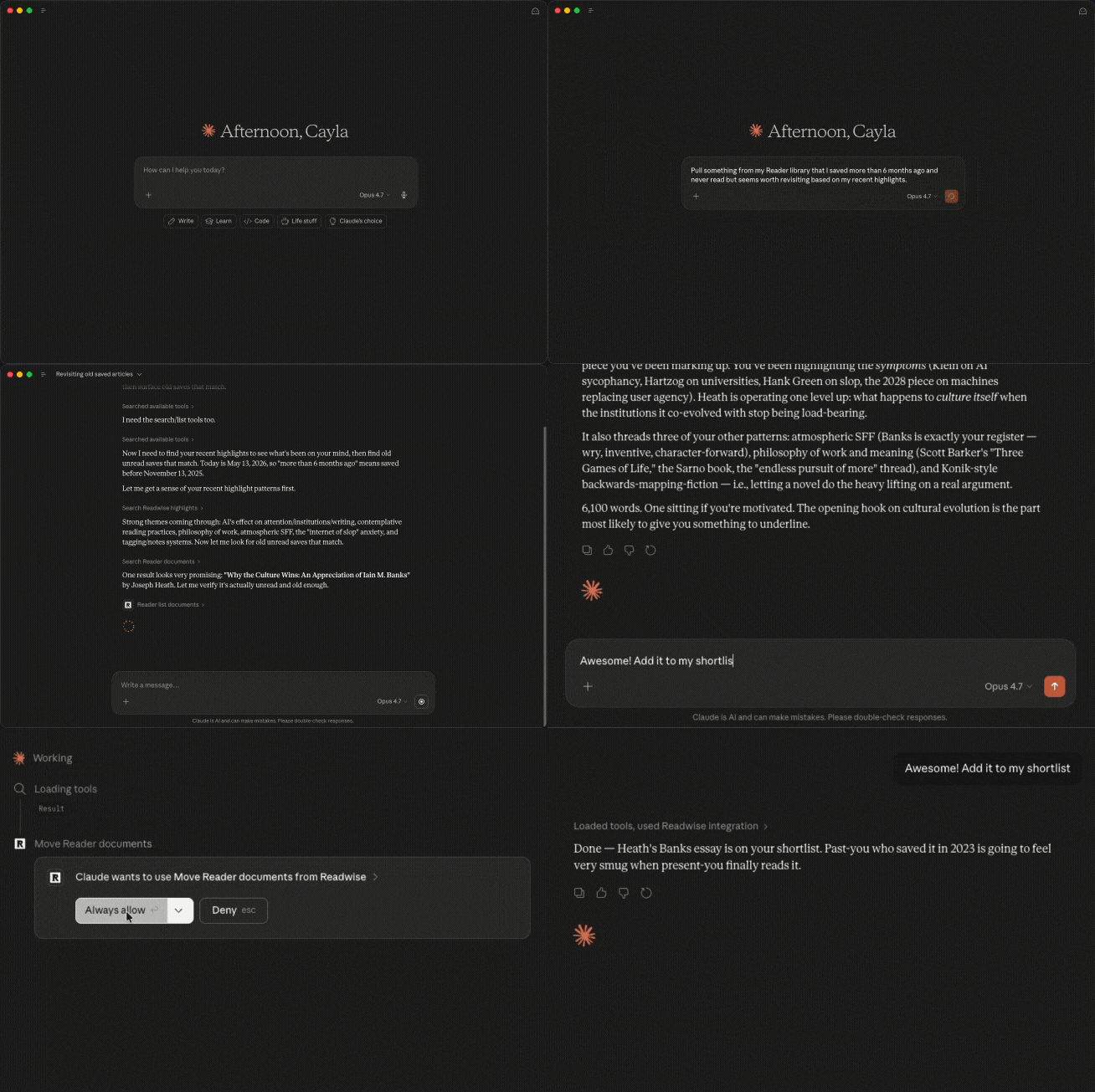
Pull something from my library that I saved more than 6 months ago and never read but seems worth revisiting based on my recent highlights.
Or pick up where you left off across documents you started but didn't finish:
Find documents in my Reader library that I started reading but didn't finish, and tell me which one to pick back up.
Refine your recommendations with filters
You can layer constraints onto the basic recipe to get tighter, more relevant suggestions.
To match a time budget:
I have about 20 minutes. Recommend one article from my library that fits that read time and matches what I've been highlighting lately.
To narrow by topic:
Recommend three saved articles about AI from my library. Prioritize ones I haven't opened yet.
To filter by source or document type:
Recommend a newsletter from my Reader feed that I haven't read this week.
You can stack filters (combine read time with topic, or source with recency) to narrow it down further.
Take action on what's recommended
This is where the MCP shines compared to plain chat: it can do the thing, not just suggest it. You can ask your AI to tag, shortlist, or archive documents in the same prompt.
To tag a batch of recommendations:
Recommend 5 articles from my library that I should read this week, then tag each one with `to-read-this-week`.
To move picks to your Shortlist:
Find 3 long-form articles related to my recent reading and move them to my Shortlist.
To recommend and triage in one pass:
Look at my Reader inbox. Recommend 3 to read this week, archive anything that's clearly stale, and tag the rest with `decide-later`.
The MCP can take real actions on your library (moving documents, applying tags, archiving, or even deleting). Always tell your AI to confirm changes with you before making them, especially the first few times you run a new prompt.
Look beyond your library
Your highlights and saves can also seed recommendations for things you don't already have, like books to buy, articles on the open web, or new sources to follow.
For book ideas:
Based on the topics I've been highlighting in the last few months, suggest 5 books I should consider reading.
For articles on the open web:
Look at the articles I've highlighted recently. Suggest 3 articles or essays from the web that go deeper on those themes. Include links.
For new newsletters or creators to follow:
Based on the publications I read most often in Reader, suggest 5 newsletters or Substack writers I should subscribe to.
Recommendations beyond your library depend on your AI tool's web search ability. Most AI apps support this in some way, but your results may vary.
Build recurring recommendation workflows
Once you have a prompt that works, you can bake it into a routine.
For a weekly reading batch:
Every Monday, pick 5 articles from my library for me to read that week, tag them with `week-of-[date]`, and put them in my Shortlist.
For a single quick pick when you have a moment:
Give me one article from my Reader library that I can finish in about 25 minutes and that builds on what I've been highlighting lately.
To intentionally break out of your reading patterns:
My recent reading has been heavy on [topic]. Recommend 3 articles from my library on different topics so I get a more varied diet this week.
If your AI tool supports saved prompts or projects (like Claude Projects or ChatGPT custom GPTs), you can save these as one-click workflows. Or use something like Claude Code's /schedule feature to automatically run a recurring job.
FAQs
Why didn't the recommendations include articles I know I have saved?
The MCP indexes your library, but search and recency filtering can miss things. Try being more specific (mention the topic or roughly when you saved it), or ask the AI to list documents by topic first and then recommend from that list.
Can I undo a tag or move that the MCP made?
All actions the MCP takes are reversible the same way you'd undo them in Reader (remove the tag, move the document back, or restore from archive). You can also ask the AI to undo what it just did.
Why can't my AI access my Reader docs?
You may be using the older Readwise-only MCP server, which doesn't have access to Reader documents. Switch to the new MCP server (mcp2.readwise.io/mcp), which covers both Readwise highlights and Reader documents. You can find setup instructions on the MCP setup page.